 About the Module Bay
Dell™ Latitude™ D610 User's Guide
About the Device Security Screw
Removing and Installing Devices While the Computer Is
Turned Off
Removing and Installing Devices While the Computer Is
Running

|
CAUTION: Before you begin any of the procedures in this section, follow the safety instructions in the Product Information Guide. |
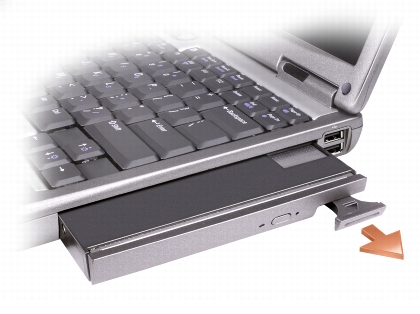
You can install devices such as a floppy drive, CD drive, CD-RW drive, DVD drive, CD-RW/DVD drive, DVD+RW, second battery, or second hard drive in the module bay.

|
NOTE: You do not need to install the device security screw unless you want to prevent the module from being easily removed. |
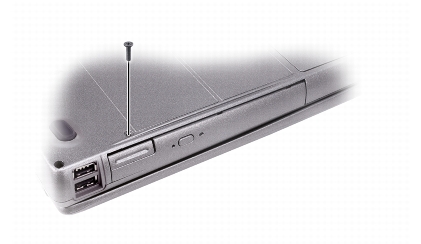
Your Dell™ computer ships with a CD/DVD drive installed in the module bay and a device security screw, which is not installed in the CD/DVD drive but packaged separately. When you install a module in the bay, you can install the device security screw to prevent the module from being easily removed.
If the device security screw is installed, you must remove the screw to remove the module from the bay:
|
|
NOTE: If the device security screw is not installed, you can remove and install devices while the computer is running and connected to a docking device (docked). |

|
NOTICE: To prevent damage to devices, store them in a safe, dry place when they are not installed in the computer. Avoid pressing down on them or placing heavy objects on top of them. |
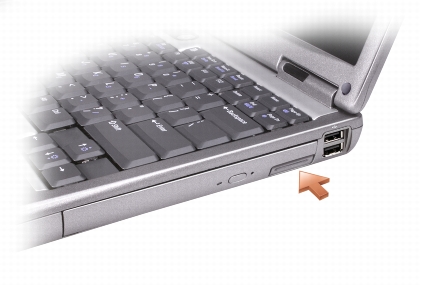
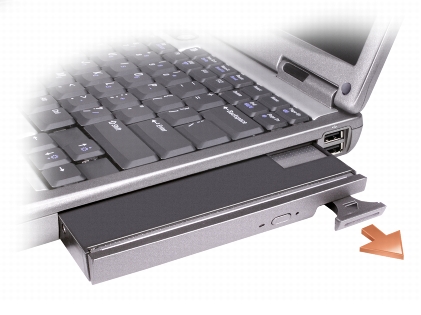
|
|
NOTICE: If the device security screw is installed, you must turn off the computer before removing the screw. |
|
|
NOTICE: To prevent damage to devices, store them in a safe, dry place when they are not installed in the computer. Avoid pressing down on them or placing heavy objects on top of them. |
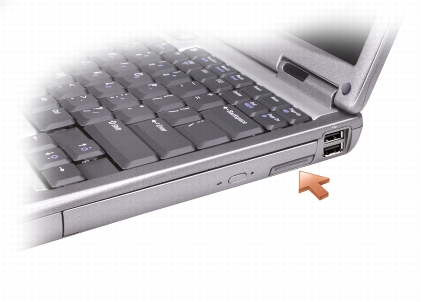
The operating system automatically recognizes the device.