This track consists of a single envelope.
It controls the playback speed within a given range, i.e. it facilitates envelope-based resampling. The envelope handing is exactly the same as for the volume envelope.
Clicking on the track panel reveals a few options, similiar to the ones of the track panel of an audio track.
"Set Range" lets you set the minumum and maximum range of pitching. It is expressed in percentage values relative to 100%.

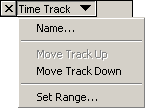
Start by choosing New Time Track from the Project Menu. Then change the range of time warping by clicking on the Track Pop-Down Menu and choosing Set Range (an option which only appears for Time Tracks)
You can also optionally choose the converter from a choice of 5 algorithms, from fast and low quality to slow and high quality.
Older computers may be incapable of playing audio in real-time that makes use of a Time Track, however you can always Export the file as a WAV and then playback the WAV file later.
To edit the time warping, choose the envelope tool from the Control Toolbar - the same tool you use to edit amplitude envelopes in Audio Tracks. Click to create and edit control points. Drag points off-screen to delete them.
The Time Track has a ruler. As you edit the warping, the ruler will warp to show you at what time playback will reach each place in the audio.